


General Description
Title of your rocket
Upload your logo
Upload banner
Rocket description
Token creation
Create or Connect your existing token
Token name & Token Symbol
Decimals
Token Supply
Token Description
Token Price
Choose your coin & your token
Token Price
Give Life to your Token
Soft Cap & Hard Cap
Minimum & Maximum Contribution
Total Tokens to Sell
Start Time & End Time
Security Terms & Badges
Badge Explanation
Liquidity Lock
Developer Vesting
Recovery Protocol
KYC & KYB
Token Price
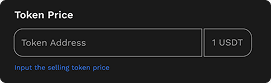
 2. Token Price
Defines the initial exchange rate rate between the project token and the base currency (e.g., USDT).
Pixpel uses this information to establish or reference the token’s liquidity pool during the Rocket creation process.
Case 1 — The Token Has No Existing Liquidity Pool
When the token is new, Pixpel automatically:
- Creates a liquidity pair (e.g., USDT/PIXP) inside Pixpel’s decentralized exchange.
- Locks the minimum required liquidity to generate the first on-chain price.
- Uses this initial ratio to define the token value during the contribution period.
Example
1 USDT = 50 PIXP → the pool starts balanced with equal value in both tokens.
As contributors join, the liquidity expands proportionally, maintaining the price curve.
Case 2 — The Token Already Has a Liquidity Pool
If a liquidity pool for the same token already exists within Pixpel’s ecosystem:
- The Rocket automatically links to that existing pool.
- The system imports the live market price and uses it as the reference value.
- No new liquidity is created, avoiding duplication or artificial inflation.
This mechanism ensures that tokens already trading on Pixpel maintain a single consistent price across all Rockets and pools.